Send a Quote Before You
Hang Up the Phone
Win more jobs by sending a professional quote faster than the other guy even calls back. Customers call multiple mechanics — the first one to send a clear, professional quote has a massive advantage. Trackara Pro gets you quoting in as little as 60 seconds with pre-built templates, digital approval, and one-tap invoice conversion.
Slow Quotes Lose Work. Unprofessional Quotes Lose Customers.
The quoting process is where mobile mechanics win or lose business — and most don't even realize it.
Slow Quotes Lose Jobs
Customers call multiple mechanics. The first one to send a clear, professional quote has a massive advantage. Every hour you wait is a job at risk of going to someone faster.
Handwritten Estimates Look Unprofessional
A blurry photo of a notepad doesn't build trust. Customers judge your professionalism before you even show up. A clean digital quote signals you're the real deal — worth paying more for.
No Way to Track Approvals
Did they approve it? Are they still thinking? Did it expire? Without a system, quotes fall through the cracks and you lose jobs you didn't even know you had.
Quote Like a Pro, From Anywhere
Pre-built templates, digital signatures, and status tracking — so no job ever falls through the cracks again.
Pre-Built Service Templates
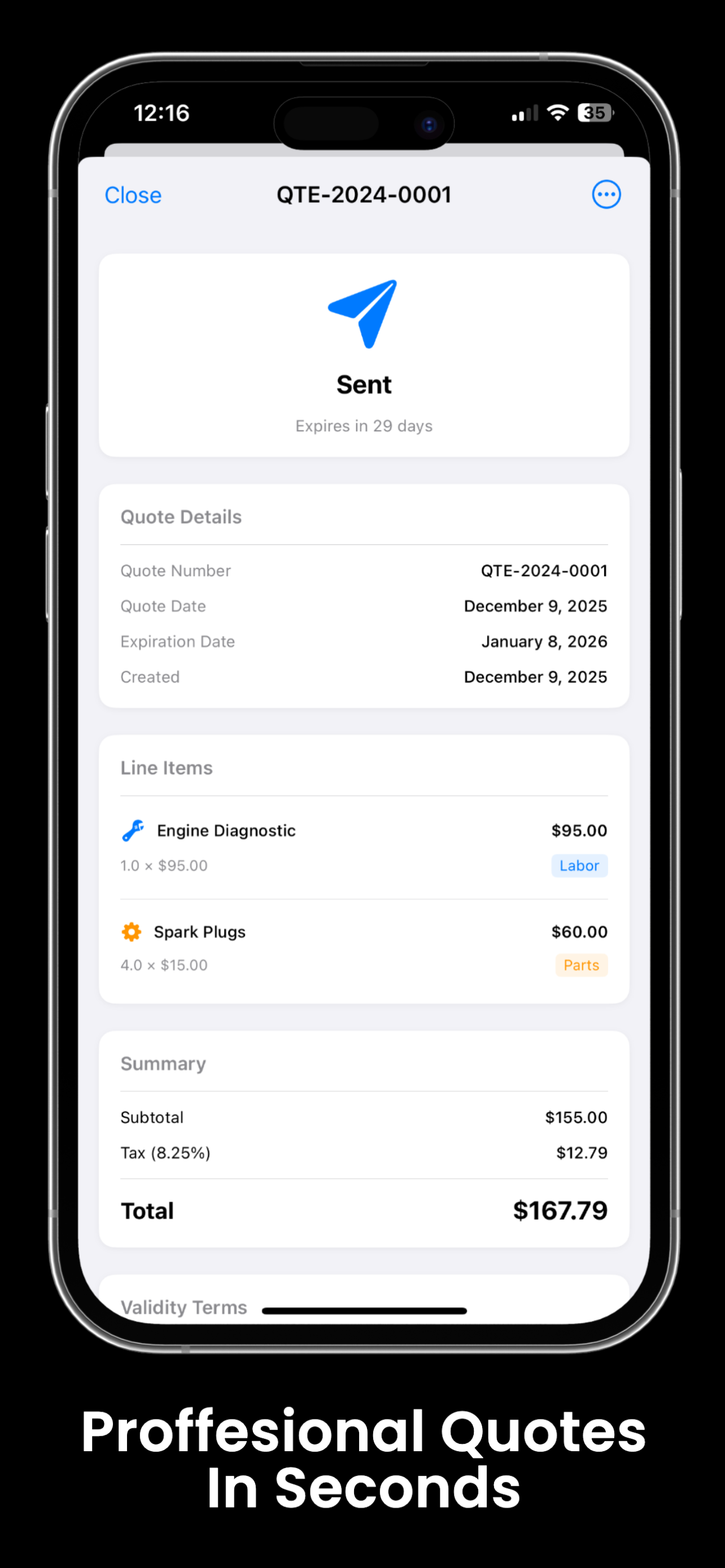
Build your most common services once — oil change, brake job, tune-up. Tap to add them to any quote in seconds. No typing the same thing over and over for every customer.
Custom Line Items
Every job is different. Add custom labor, parts, and fees with descriptions, quantities, and pricing that fit exactly what the customer needs — no template required.
Quote Expiration Tracking
Set an expiration date on every quote so pricing doesn't linger indefinitely. Protect yourself from customers showing up months later expecting the same rate you quoted in winter.
Digital Approval with Signature
Customers can review and sign your quote digitally. No paper. No back-and-forth. A clear approval record protects you if there's ever a dispute about what was agreed.
Status Management
Track every quote as Draft, Sent, Approved, Declined, or Expired. See at a glance what's pending and what needs follow-up — nothing falls through the cracks, ever.
One-Tap Convert to Invoice
When the job is done, convert your approved quote to an invoice in one tap. All line items transfer automatically — no re-entering anything, no billing mistakes, no wasted time.
From Customer Call to Approved Quote in Under a Minute
Templates do the heavy lifting. You customize, send, and win the job before the competition even picks up the phone.
Pick Your Services
Select from your saved service templates or add custom line items. Pricing pulls automatically from your catalog. The quote builds itself as you add services.
Customize the Pricing
Adjust any line item. Add parts, additional labor, fees, or notes. The total updates instantly as you build. Set an expiration date so the quote doesn't haunt you later.
Send for Approval
Send the quote to your customer. They review it, ask questions if needed, and sign digitally to approve. You get a notification the moment they approve — no more following up blind.
Convert and Go
After the job, tap Convert to Invoice. Every line item transfers automatically. You're billing in seconds, not minutes — and your profit is already calculated.
The Mechanic Who Quotes First Wins
with pre-built templates
before competitors respond
no paper, no guessing
Quotes Connect Your Entire Job Workflow
Invoicing
Convert approved quotes in one tap. All line items transfer automatically — no re-typing anything.
Learn moreWork Orders
Quoted work flows into job tracking with digital signatures and photo documentation.
Learn moreClient Management
Every quote is tied to a client and vehicle record. Full quote history at your fingertips.
Learn moreScheduling
Book the job right after approval. Send the quote, get the signature, schedule the appointment — all in the same app.
Learn moreWin More Jobs With Professional Quotes
The mechanic who quotes first wins. Trackara Pro gets you quoting in seconds — before the customer even hangs up. Start your 14-day free trial — cancel anytime.
Quotes & Estimates FAQ
Answers for mobile mechanics
Can I send quotes from my phone as a mobile mechanic?
Yes. Build a quote in seconds using service templates or custom line items, and send a branded PDF right from your iPhone, iPad, or Android phone — while you're still standing next to the customer's vehicle.
Can customers approve quotes digitally?
Yes. Customers can sign the quote on your device or approve it remotely. Once approved, convert the quote to a work order or invoice with one tap — no re-entry.
Do quotes expire automatically?
Yes. Set an expiration date on every quote. Trackara Pro shows which quotes are still open, which are expired, and which converted to paid invoices — so nothing falls through the cracks.