Never Double-Book
a Job Again
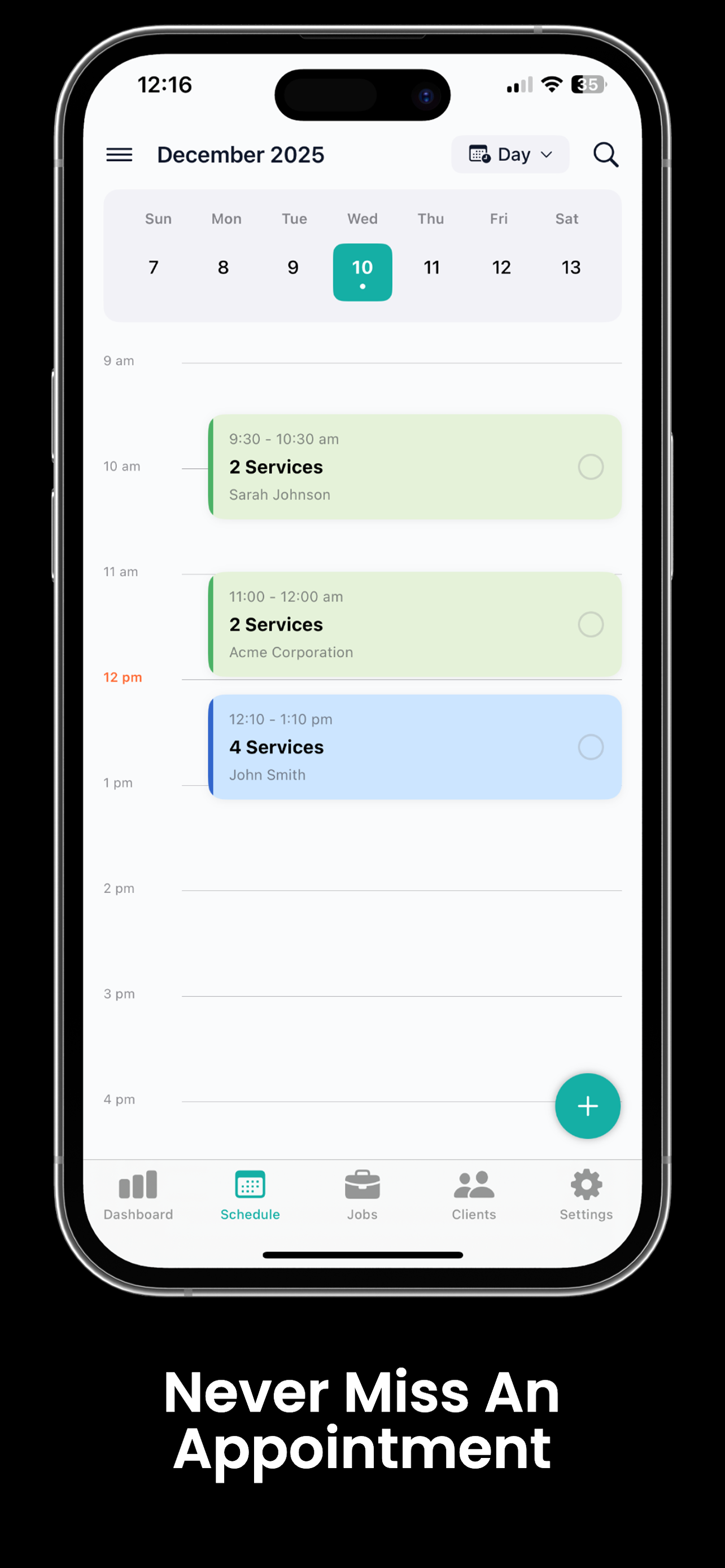
When you're juggling 5–8 jobs a day from your phone, it's easy to overlap appointments or forget one entirely. Trackara Pro gives you a visual calendar that shows your full schedule at a glance — with service details, client info, and vehicle history for every job.
Running Your Schedule From Memory Is Costing You Jobs
Every mobile mechanic has been here. Here's what it looks like when your schedule lives in your head.
Double-Booking Jobs
You told two customers the same time slot because your schedule is in your head. Now somebody's waiting, you're rushing, and both jobs suffer. One of them won't call back.
Forgetting a Customer
A customer booked with you last week but you never wrote it down. They're sitting in their driveway waiting while you're on the other side of town. That's a lost customer — and a bad review.
No Weekly Overview
You can't see what's coming up this week without scrolling through texts and call logs. You have no idea if Tuesday is packed or wide open until it's too late to book more jobs.
A Calendar Built the Way Mobile Mechanics Work
Not a generic calendar app. A schedule built around jobs, clients, vehicles, and the way your day actually runs.
Color-Coded Calendar
See your appointments laid out visually with color-coded entries. One glance tells you what kind of job it is, where you need to be, and how packed your day looks.
Service Selection
When you book an appointment, select the service right then and there. Oil change, brake job, diagnostic — it's attached to the appointment so you know exactly what you're walking into.
Client & Vehicle Linked
Every appointment is tied to the client record and their vehicle. Tap the appointment and see the customer's name, phone number, vehicle year/make/model, and full service history.
Maintenance Reminders
Set up recurring service reminders so you never forget to follow up on oil changes, tire rotations, or scheduled maintenance. Proactive follow-ups mean repeat business with no extra effort.
Calendar Sync
Sync your Trackara Pro schedule with your phone's built-in calendar. See mechanic jobs alongside personal appointments so nothing overlaps and nothing gets missed.
Daily, Weekly & Monthly Views
Switch between daily, weekly, and monthly views to plan your time the way you need to. Zoom in on today's jobs or zoom out to see how your month is shaping up.
Your Day at a Glance
Open the app in the morning and see exactly where you need to be, what you're working on, and who you're working for.
No scrambling through texts to figure out the plan. No calling customers to ask what car they have. It's all right there — organized, linked, and ready before you turn the key in the van.
3 jobs booked. All client info one tap away.
Oil Change — Mike Johnson
2019 Honda Civic · 1425 Oak St
Brake Pads — Sarah Williams
2021 Toyota Camry · 890 Elm Ave
Diagnostic — James Carter
2017 Ford F-150 · 2200 Pine Rd
Scheduling Connects Your Entire Workflow
Client Management
Every appointment links to a client record with full service history. Show up knowing everything.
Learn moreQuotes & Estimates
Send a quote before the appointment so pricing is clear and approved before you arrive.
Learn moreWork Orders
Turn a scheduled appointment into a digital work order with one tap. Signed and documented.
Learn moreTime Tracking
Start the clock when you arrive at a scheduled job. Track every minute billed to that appointment.
Learn moreReady to Take Control of Your Schedule?
Stop juggling texts, sticky notes, and mental math. Trackara Pro gives you a real calendar built for the way mobile mechanics work — with client info, vehicle history, and service details, all in one place.
Scheduling FAQ
Answers for mobile mechanics
Can I sync Trackara Pro with my phone calendar?
Yes. Appointments sync to your iPhone/iPad calendar (iCloud) or Android/Google calendar automatically, so you see mobile mechanic jobs alongside the rest of your day.
How does Trackara Pro prevent double-booking?
When you book an appointment, Trackara Pro blocks that time slot and flags any new booking attempts that overlap. You'll never accidentally commit to two jobs at the same time.
Can I set maintenance reminders for repeat customers?
Yes. Set a return date on any job and Trackara Pro reminds you to reach out when a customer is due for their next service — brake fluid flush, oil change, timing belt, whatever you scheduled.